Friday, June 22, 2007

Developing on Vista - Part 2

To UAC or not to UAC?
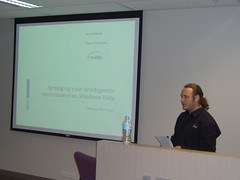
Presenting At Victoria.Net SIGWhen I presented on this at the Victoria .Net SIG meeting a week ago, I wasn't quite sure of the general understanding amongst the group about User Account Control (UAC), so I asked the question, "Who here knows what UAC is?", and about 5 (out of 50) people put up there hands. I had intended on launching straight into my argument, but with the vast majority of people not knowing what UAC was, I had to explain a bit about UAC first, so I'll do the same here.

If you are already familiar with UAC, feel free to skip over this explanation and go on to Developing with UAC.


What is UAC?

You may have seen the very funny Mac Vs PC Advertisement that makes fun of UAC, although it is a bit of an exaggeration. Mal-ware has been a serious problem for Windows (as Apple are not backward in pointing out), and the reasons that mal-ware is such a problem stem from the way in which the vast majority of Windows PCs are used. By default, when you create a new user on a new Windows based machine, they are set up as an Administrator (ie have unfettered access to any part of the system, files, registry, hardware etc...). This means that unlike linux or unix based operating systems, you do not need to log in as a user with higher permissions to install software or make system level changes etc..., which significantly lowered the barrier to the general population being able to use PCs, and is part of the reason for the success of Windows as an OS in the home user market. It has also meant a lower barrier of entry to mal-ware which is why we have such a problem. In a unix or linux environment, if a user accidently runs a virus, or if a piece of mal-ware infiltrates the system through a user application, the most that it can do is infect files that the user has control over, which means that it won't infect any system files because a unix/linux user would never dream of running as an administrator when performing normal tasks

It's not like Windows XP forces you to run as an Administrator, in fact in many corporate environments that have a dedicated IT department controlling their network, users are configured to run as normal users on their own machines.Tasks like installing software and configuring networks and drivers are generally handled by the IT department using various remote administration technologies. This makes for a much more secure corporate environment, and means that users can't install malicious software accidentally.

Ideally everyone should be running as a normal (non-administrative) user when doing normal day to day activities, even if the computer is their own personal home PC. The reason people don't do this is 2 fold. Firstly because it is the default when installing a new operating system, and secondly, a lot of applications have been written for windows that for no good reason require Administrative access to system resources. So UAC is Microsoft's first attempt at fixing this problem.

In Vista by default when you create an Administrative user, Vista will generate 2 separate user tokens, one that has Administrative access to the system, and another that has normal user (restricted) access to the system. When the user is logged into Vista, by default the system uses the token associated with the normal user, but if an application attempts to do something that requires elevated privileges, Windows Vista will warn the user with a dialog asking if they started the program, and if it's OK to use the Administrator token to perform the operation. This means that if malicious software tries to infiltrate the system without being detected by the user, as soon as it attempts to do anything that requires administrative access, it's cover will be blown, and the user alerted to what's going on.

As with many things in Windows, you can actually turn UAC off completely, however, this just puts the user back into the position you were running Windows XP with Administrative privileges. A better approach is if an application requires administrative permissions (and really the only types of applications that should are system utilities that are performing low level administrative style tasks, not your general run of the mill user application), then you should use the "Run As Administrator" option to start the application. This means that you give that application the permission to run using your administrative token, while everything else uses your normal user token, protecting you from malicious software.

Now I'll be the first to admit that UAC isn't perfect, and especially as a developer, I do find myself getting a lot of UAC warnings as I perform certain tasks, but I personally think it's a step in the right direction. I also believe that for most normal users, these UAC warnings will happen so infrequently that they shouldn't be a problem.


Further reading on UAC:


Developing with UAC

Visual Studio 2005

When Vista first came out, and the early adopters in the development community first started using it as their primary development platform, there were many issues. One thing that did happen when you attempted to run Visual Studio as a normal user is that it would display a warning saying "You should run Visual Studio as an Administrator". In fact this was the official line from Microsoft, and as far as I'm aware still is. I also believe that this is WRONG! Service Pack 1 and the Updates for Windows Vista have fixed a lot of problems, and it is now possible to run Visual Studio and perform MOST of the tasks you do as a developer in normal user mode. The majority of things work just as they did on Windows XP. Developing Console Applications, Winform Applications, WPF Applications, and many more types of applications DO NOT require you to be running Visual Studio as an Administrator. However, there are some scenarios where you may still need to run Visual Studio as an Administrative user.

Most of the problems revolve around trying to debug into processes that you don't own. For instance if you are developing an ASP.Net application and you are using IIS7 instead of the the Visual Studio Development Webserver (Cassini), then debugging requires you to attach to the w3wp process. Not surprisingly, this requires you to have Administrative Privileges, and currently there is no way from within Visual Studio to elevate those permissions on the fly, so if you are intending on doing this, you'll need to start Visual Studio as an Administrator. Alternatively, you could use the Visual Studio Web Development Server (Cassini) to host your application while in development. Cassini quite happily allows you to attach and debug into it as it is started by the same user that started Visual Studio. It also has the advantage of allowing the "edit and continue" feature of Visual Studio debugging (something IIS7 or IIS6 can't do), and it is generally a little faster. Cassini will behave identically to IIS7 in the vast majority of scenarios, however there are some deficiencies with Cassini. It can't use the HTTPS protocol, in this case I usually find myself adding a configuration setting to determine if I am in development or production, and switching to use HTTP when in development. It also can't emulate subdomain scenarios properly. So if you need to test Single Sign On scenarios across subdomains, then you will need to use IIS7. There are also some other subtle differences in the way Cassini processes the ASP.net pipeline to the way IIS processes it. I am a firm believer in testing your application as close to your final production environment as is practicable, so I do recommend that final stage development testing is done against IIS, and not cassini, but you should only need to debug using IIS7 if you find a problem that only occurs when running the application under IIS7, and does not exhibit when running under Cassini.

Another thing that I have found to be problematic is installing assemblies into the GAC. Installing assemblies into the GAC is by it's very nature an administrative task, and requires elevated privileges. I have seen many projects that, as part of a post build step automatically deploy the newly created version of a shared assembly to the GAC. Obviously if you are running as a normal user, this post build step will fail, thus causing the build to "fail". Now personally I would question the need to install libraries to the GAC during development, and would encourage development teams to look at ways of privately deploying shared libraries during the development phase instead of deploying to the GAC. Adding a probing element, or a codebase element to the applications configuration file will allow you to share common assemblies amongst applications during development. However, if you insist on installing libraries to the GAC in a post build step, then you will have to run Visual Studio as an Administrator for that project to build.

There are some other minor glitches that are left over as a result of Visual Studio 2005 not quite being vista ready, (see Issues running Visual Studio 2005 on Vista as a normal user). Even running Visual Studio 2005 with elevated permissions there are still some minor problems on vista, (see Issues running Visual Studio 2005 on Vista With Elevated Privileges), but these issues occur infrequently enough, or there are adequate workarounds for them not to be a problem (at least in my experience).


SQL Server 2005

When Vista first hit the streets, SQL Server 2005 Service Pack 1 had already been out for some time, but unfortunately there were still lots of incompatibilities with Windows Vista. Most of us were forced to run SQL Server Management studio as an Administrator to tackle some of these issues. Service Pack 2 fixes a lot of these problems, and certainly after running the user provisioning tool, there is no longer any need to run SQL Server Management Studio as an Administrator anymore. There are still some issues mainly around Microsoft Visual Studio for Applications (VSA) used in SSIS script tasks, but beyond this, there are few significant problems.

See Windows Vista Considerations in the Service Pack 2 Readme document.


Why not just turn UAC Off?

Many developers argue that they are experienced computer users and as such feel somehow immune to mal-ware, and anyway, they run anti-virus software, so they are protected against malicious software attacks. They also argue that they constantly need to perform tasks that require administrative privileges, and therefore feel that turning UAC off all together will save them heaps of time, and put an end to all the UAC warnings.

Although dubious, let's assume for a moment that the first argument holds some water. I hope by now I will have been able to convince you that you don't need to run Visual Studio as an Administrator all that often. I would also argue that the effort of Clicking "Continue" from time to time on UAC dialogs when you do need to perform Administrative tasks is not going to cost you that much time in the grand scheme of things.

Another argument to keep UAC switched on is put very eloquently by Ian Griffiths, in his post UAC: Don't be part of the problem. Ian argues (as I did in my explanation of UAC) that part of the reason people feel they have to run as an administrator on Windows is because there are so many end user applications that require Administrative privileges for no good reason. He then goes on to argue that the reason that so many applications require elevated privileges is that they were written by developers who were running as Administrators on their own machines at the time of development, and were completely unaware that the code they were writing would not run without elevated privileges. he quite rightly says that this sort of behaviour in the linux/unix/OS X development community would be frowned upon, and the resultant applications would just not get used. Please DO NOT turn off UAC before reading Ian's article.

I would also argue that always running Visual Studio as an Administrator is just as bad (at least from the point of view of Ian Grifiths' argument) as turning UAC off altogether, because when you debug your applications, they will always be launched with elevated privileges, and you will never see potential normal user problems.

I come from a position of having developed as a normal user on Windows XP, and it is soooo much easier to develop with UAC on Vista than as a normal user on Windows XP. It is also much more secure. If you were developing as a normal user on Windows XP and needed to run something with elevated privileges, you would have to use the "Run As" command which would require you to type in your administrator password every time. The more times you are forced to type in a password the more chance there is of over the shoulder credentials theft. UAC simply requires you to validate that it was you who invoked the task that required the elevation of privileges.


Tips to help you stay on the wagon

Here are a few tips to help you run on Windows Vista and navigate the potential problems of UAC.

  • Add Visual Studio 2005 to the quick launch menu

Quick Launch

This not only makes it quick and easy to find, but on the rare occasions when you do need to run Visual Studio as an Administrative user,  you can simply right click the icon, and select "Run As Administrator"
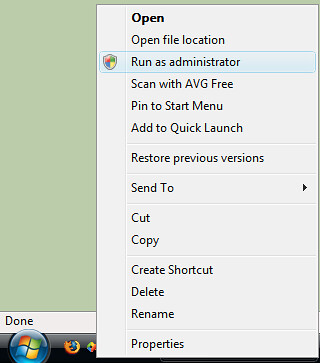
Run As Administrator

  • If you find yourself needing to perform lots of administrative tasks, simply run a command prompt with elevated privileges and keep it open as you develop. Anything you run from this command prompt will automatically have administrator privileges, and you won't get asked to confirm the elevation of privileges.

I am sure that there are a lot of people out there developing on Vista who have come up with some really good stratergies for developing on Vista, and I'd love it if you could leave any other tips/suggestions as comments on this post.


Conclusion

If there is one thing I hope you take from this post it's you don't need to turn UAC off to develop on Vista. Also that you don't always need to run Visual Studio 2005 as an Administrator all of the time.


Links


Technorati tags: , , ,

Wednesday, June 20, 2007

Developing on Vista - Part 1

As promised, I am putting together a series of articles around setting up your development environment on Windows Vista. I have been using Visual Studio 2005 and SQL Server 2005 (amongst other development tools) on Windows Vista since November 2006, and I must admit that the experience hasn't been all plain sailing.

Pasha Bulker 2

However, with the release of service packs for both Visual Studio 2005, and SQL Server 2005 that address some of the problems, the situation now is much better than when I started. There has also been a lot of mis-information disseminated about how Visual Studio 2005 and SQL Server 2005 interact with UAC leading to some confusion about how we should run them.

In Part 1 Installing the toolset I hope to give some guidance around getting your development environment installed and running. In Part 2 To UAC or not To UAC? I'll explain the issues around User Account Control (UAC) in some detail, and hopefully convince you that you don't need to run Visual Studio 2005 as an Administrator all the time. In Part 3 I'll attempt to answer the question Why Move to Vista, and in Part 4 Tidying up I'll discuss what's not supported, give some general tips and tricks for developing on Windows Vista, and link to some further reading that might be useful.

Installing the toolset

As developers we all have various tools and utilities we just can't live without. I am a .Net developer, and as such I wish to limit this discussion to the Visual Studio 2005 and SQL Server 2005 toolset. I will talk about a few of the other tools that I have had dealings with, but it will by no means be a complete list. I encourage anyone who has experience (good or bad) with a particular tool on Windows Vista to leave a comment on this post.

Choose a Vista

The first step when taking the plunge into Windows Vista, is to decide on what version of Vista is appropriate SKU of Windows Vista. The good news is that Visual Studio and SQL Server are supported on all SKU of Vista. There are however some issues when running Visual Studio 2005 on versions of Vista that don't support Active Directory, so my general advice is to choose one of the following versions

Order of Installation

Since I started using Visual Studio 2005, and SQL Server 2005 back in January 2005 (yes that's right almost a year before they RTM'ed), I have installed the toolset many times, and had some success as well as some pain. I have developed the following order of installation based on this experience, and also on my experience since starting using Vista (November 2006).

  • Set up IIS 7
  • Install SQL Server 2005 Service Pack 2
  • Install Visual Studio 2005 Service Pack 1 With Vista Updates
  • Install any other tools that you can't live without.

I will go through these step by step.

Set Up IIS7

By default IIS7 is not installed when you first set up Windows Vista, this is part of Microsoft's attempts to reduce the potential attack surface of the base OS, and make it a more secure environment for everyday users. However, if you're intending on doing any ASP.Net development, or want to run SQL Server Reporting Services, you'll need to install it and configure it appropriately.


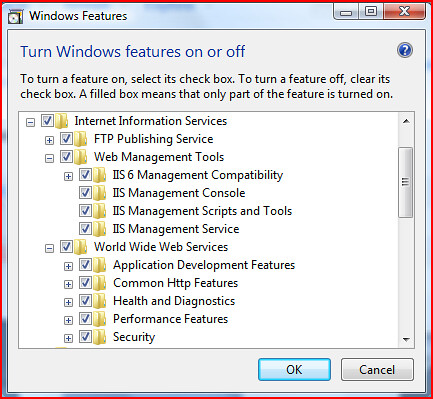
To Install IIS7, Go to Start->Control Panel->Programs and Features, and select "Turn Windows Features on or off". In the "Windows Features" dialog, select "Internet Information Services", and ensure that you enable the following features as a minimum.

  • IIS 6 Management Compatibility
    • Without this, you can sometimes get some cryptic errors when performing certain tasks about not having Microsoft Front Page Extensions installed"
  • .Net Extensibility
  • ASP.Net support.

Figure 1 shows how this might look.


IIS7 Setup

Figure 1


Install SQL Server 2005

Obviously you need to decide on what SKU of SQL Server you want to use. For developers this usually comes down to a choice between SQL Server 2005 Developer Edition and SQL Server 2005 Express Edition. I personally prefer to run SQL Server Developer edition on my primary developer environment because I often use features that are not available in the Express version. This does not mean that you can't install SQL Server Express as well if you need to develop against it, but I would suggest installing the developer edition first. So the sequence would be...

User Provisioning allows you to add Vista users to the sysadmin fixed server role, make sure you provision the user you develop under.

* Be careful when performing the user provisioning immediately after the Service Pack install. Because the service pack requires you to stop ALL SQL Server Services, and doesn't re-start them before asking you to perform User Provisioning, the user provisioning will fail unless you explicitly go and re-start the SQL Server services. Failing this, you can always run the User Provisioning tool from your SQL Server installation at a later point.

C:\Program Files\Microsoft SQL Server\90\Shared\SqlProv.exe

Install Visual Studio 2005

Again, you'll need to choose which SKU of Visual Studio you wish to run, but once you have made the choice, the installation procedure is as follows.

If you wish to start writing .Net 3.0 applications, then you'll also need to install the following

NB the extensions for WPF and WCF is a CTP release, and as with most CTP software, there are some problems with it (running either on XP or Vista), and as far as I'm aware, this is the state it is remaining in until Orcas is released (I guess MS need to have something to encourage people to upgrade to Orcas when it comes out).

Install any other Tools you can't live without

At this point, you can then install any other tools/utilities/plug-ins that you normally use. Just check with the manufacturers around each tools compatibility with Vista, I will discuss in a later post some tools that have issues, but my experience on the whole is that most tools work fine on Vista.


Conclusion

This will get you to a point where you are ready to start developing on Vista. Most things should work just as they did on Windows XP, however, keep in mind that these tools were specifically written for Windows XP, and there are still some notable exceptions to this rule which I will cover in my next post.


Technorati tags: , ,

Tuesday, June 19, 2007

.Net SIG Presentation Wrap up

Well, I must say I got a bit of a shock when I asked "How many people are using Vista as their primary development environment, and 4 people out of 50 put up their hands. Maybe it's just the Readify culture, but most of us at Readify are using Vista as our primary development environment, (some at Readify have been using it since before RTM), and I had expected that a significant proportion of Developers would by now be using Vista as their Development platform.


This surprise sparked a question. "Why is it that so few Developers are running Vista as their development platform?" I'm not suggesting that Vista will suit everyones needs, or that people should upgrade just for the sake of upgrading, but developers are generally NOT techno-phobes, and are usually fairly quick to adopt new technologies that increase their productivity, or even just for the novelty value.


I guess there are numerous reasons why this might be the case, but one that occurs to me is that the information required to set up your development environment on Windows Vista seems to be spread around various places on the web making it a significant research task to find all the details. There has also been some mis-information that has lead to confusion. This I feel I am in a position to rectify. As a resut I have decided to do a series of posts aimed at accumulating the best practices around setting up your development environment on Windows Vista.


As I promised in my presentation, here is a link to the slides from my presentation, however, I will over the next few days put together a series of posts that cover roughly the same concepts as in my presentation, but go a little bit more in-depth.

Friday, June 08, 2007

Latent bug syndrome

Today I have fallen foul of what I call the "Latent Bug Syndrome". This will hopefully help people understand just how complex software engineering is, and why bugs occur in software despite the best efforts of all involved. Let me explain.

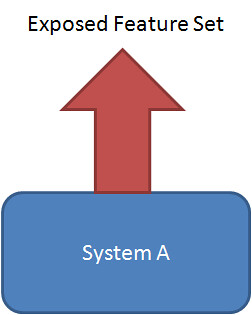
Let's say you have a system like the following.

SystemA

where System A represents a fairly complex, fully featured, fully tested product that exposes cerrtain functionality to the end users. Now System A can be operating 100% perfectly (or at least for the overwhelming majority of scenarios that are encompassed by the exposed feature set), however there still may be a "Latent Bug" hidden deep within the underlying logic of this system that is never exposed to the end user because the exposed feature set never actually allows the system to get into the state that would cause this bug to exhibit. As a really contrived example, let's take the classic divide by zero problem


public stat double DoCalc(double val)

{

return 42 / val;

}

This function operates as expected under all conditions except where val = 0, in which case it throws an exception. If the exposed feature set only alows the user to select numbers from a drop down box that contains the numbers 1, 2, and 3, then every possible test that a tester can do will NEVER produce an error. Keep in mind this is possibly the simplest example one can find, in real life, the scenarios are far more convoluted. The wrong assumption from this is that System A has no bugs.

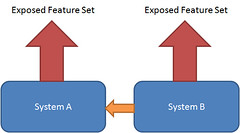
Now lets suppose that System A is augmented with System B as shown below.

systema_b

Now System B has the potenial of producing conditions in System A that not only were never tested, but were never even thought of by the original developers and testers of System A, and in my contrived example, a user input into system B may very well cause the value of the val parameter to be passed 0. The thing is that the developers (and testers) of System B are usually different to the developers (and testers) of System A, and often don't have access to the source code, or even if they do, don't have time to follow every code path through the interactions with System A accounting for every possible state that System A could possibly be in to find such a bug.

If the testers of System A are doing a good job, they may actually pick up the bug, then of course the blame game starts. Who is responsible for this bug, who's going to fix it why wasn't this bug picked up before etc....

So this happened to me today. Fortunately the bug never made it to a production system (and no it wasn't the divide by zero bug suggested above, it was infinitely more intricate), but it did make me aware that I had made some assumptions about System A that turned out to be less than 100% accurate.


So how can one guard against The Latent Bug Syndrome.


System A

  • Thorough unit tests of all public (and some times even private) methods exposed by system A will catch a vast number of these bugs.
  • Better documentation of publicly exposed methods to help developers integrating with your system understand what assumptions you are making about the input to a method, and what state you are expecting the system to be in.
  • Test Driven Development could actually go a long way to irradicating this all together because in TDD you only write code to satisfy the tests nothing less, nothing more, so you don't get the situation where there is code that under ALL conditions tested is never executed. However, I have yet to see a company embrace TDD to that extent as the sheer time involved is usually far too much to justify it commercially.

System B

  • Developers and testers of system B need to have a good understanding of how system A works, what it was intended to do, and how they are changing the way in which System A is being called. Understanding this may help you know where problem are likely to occur.
  • Know what your assumptions about System A are... and constantly question them.
  • Again unit tests are your friend.
  • wrapping your interaction with System A is also a good way of being able to respond to changes in System A if they occur.
  • Thorough end user testing (there is NO substitute).

Wednesday, June 06, 2007

VS2005 Project Templates Failing

I came across a problem recently where I went to create a standard Console Application project in Visual Studio 2005 and to my alarm I got a message saying


---------------------------
Microsoft Visual Studio
---------------------------
Could not find file 'C:\Program Files\Microsoft Visual Studio 8\Common7\IDE\ProjectTemplatesCache\CSharp\Windows\1033\ConsoleApplication.zip\ConsooleApplication.csproj'

---------------------------
OK
---------------------------


This took me back a bit, as creating a Console application is one of the most basic tasks you would ever want to do in Visual Studio 2005. my next thought (after trying exactly the same thing 5 or 6 times) was to run visual studio with elevated priviledges, but alas this still didn't fix the problem. I checked and sure enough I could still create a Windows application no problems (with or without elevating my priviledges), so I just put it down to some kind of vista weirdness and continued on (using Winforms apps instead of console apps whenever I wanted to create a quick test). Today, however, I discovered that I could no longer create Web Service Applications as they crashed with a very similar error, and with a presentation on setting up your development environment on Windows Vista looming, I decided that I had better get to the bottom of the problem.... and so I did.


It turned out to be the Guidance Automation Toolkit and Guidance Automation Extensions packages I recently installed that for some reason had done some damage to the Project Template System in Visual Studio. now I guess fair is fair, both of these packages are in beta, and there are some known issues around running them on Vista (unfortunately I was not aware of these issues at install time). One of the big issues with the Guidance Automation Extensions is around uninstalling it. You get so far, and then a dialog pops up, no title, no message, just an OK button, and it stops uninstalling. fortunately I found a blog post by one Greg Duncan on how to uninstall the Guidance Automation Extensions.


I can now happily create console and web service applications again, but more importantly stand up in front of the Victoria .Net SIG next tuesday and talk confidently about running Visual Studio 2005 on Vista.

Tuesday, June 05, 2007

Speaking at Victoria .Net SIG

Just a quick note to say that I'll be speaking at the next Victoria.Net SIG meeting on the 12th of June at Microsoft building, Level 5, 4 Freshwater Place, Southbank. Turn up for Pizza and soft drink at 5:30 pm.


The topic of my discussion will be setting up your development environment on Windows Vista. Hope to see you there.

Thursday, May 03, 2007

IT a series of stops and starts

Is it just me, or does anyone else in the industry feel that working in the IT industry is a series of stops and starts. What I mean by this is that often when i start on something that I think is going to (or at least should be) faily straight forward, quite often, very early on in the peice I come across a problem that consumes way more time than I'd expected. For example, today, I was asked to fix a bug that was occuring on a project that I was involved with no less than a few weeks ago. I know the codebase had changed significantly, as a merge with the main branch had been done. What I didn't expect was that I'd spend the first 3 and a half hours tryng to get my machine to a point where I could compile and then run the project. Now part of the problem was my grappling with the back up and restore features of SQL Server, and one could argue that I potentially should understand that better (and now do), but the rest of the time was grappling with issues that we have been having with bugs inTFS that cause issues when trying to Get the latest versin of all files in large projects. Then there are aother times like right now where I am trying to do a few things on my PC, and even though I have a fairly new DELL D820 laptop with 2GB of RAM, and 4GB of ready boost, the hard drive is churning continuously (not sure why), and it takes up to 10 seconds to switch between tasks. This may have something to do with the fact that about 20 minutes ago I had to actually reset my computer after it crashed while trying to use Explorer. I am fast approaching "a sad realisation" that although windows Vista may be more secure, it is not in any way speedy, or stable. I really think Microsoft rushed it out the door, and that the end user is paying the price. It's times like these when I start to think about work in other sectors, hmmmm.... maybe I'll start up a Tango dance studio.

Sunday, April 22, 2007

Tango performance

Just to show how behind the times I am, here is my first ever appearance on You Tube. This is a Tango performance Niki and I did last weekend at our friend Yeow's birthday party. Niki and I have been dancing Argentinean Tango for 6 years now, and it is becoming an all consuming passion.


Technorati tags:

Wednesday, April 18, 2007

It's had its fair chance, time to switch back

That's it I've had it with IE7, I used to use firefox for the vast amount of my work until IE7 came out, and in the spirit of giving IE7 a fair trial, I decided to use it as my default browser. I started this back when I was still running Windows XP, and I was then using IE7 Beta 2, and the odd crash was acceptable for a beta product. I liked the tabbed browsing, and thought theat they actually did some things slightly better than firefox. I was impressed with the efforts made in standards support, and for this reason, I had persisted with it, even though the rendering engine is significantly slower (up to 5 times slower in some cases). When I started running Visat in november last year, I noticed that from time to time IE would crash (even though it was now out of beta), but I thought "patience... Microsoft are fairly good at stabilizing their products.... eventually, and the release of Vista was a rather rushed one, just so they could get it out the door before the end of the year, so I can expect that there may be some bugs that they find and fix along the way". Well, it's now mid April, and Internet Explorer is still crashing quite frequently, and today as I was browsing some Micosoft web sites, it crashed again. This is the final straw, I think they've had long enough to fix these problems. I've just switched back to firefox as my default browser.

Monday, April 16, 2007

Blog posts as an indication of my state of mind

When I started blogging way back at the start of 2004 (see http://scottbaldwin.blogspot.com/2004_03_01_archive.html, (I'd like to say before blogging became popular, but that would definitely be a lie) I was in a very stressful job that I didn't really enjoy, it was taking up far too much of my time, and was making me feel quite frustrated with the IT industry to the point where I was almost ready to leave the field for good. So even though I found out about blogging through my work in the IT field, the first blog I started was nothing to do with IT at all, in fact musings of a morbid mind was where I intended to post all of my political rantings and ravings, my general thoughts on topics (generally outside of IT), family and travel photos etc... , and just a general writing exersize for me. I started my geek blod Daily Dribblings of a Demented Developer shortly after (May 2004), but it was always the poor cousin of my musings (btw no prizes for guessig that alliteration is one of my favourite literary devices). I started work for Readify at the start of 2005, and since then, my writings on my Geek blog have steadily increased, and my writings on my musings blog have decreased, to the point where I noticed today that my geek blog has almost caught up, and what's more surprising the blog articles I've got in the pipeline are almost ALL for my Geek blog.

Its amazing the amount of difference working for a good company can make, there are still aspects of the IT industry I'm not enraptured about, and I still get stressed from time to time when things don't work the way I expect them to, but I have come to realise that there is a lot I do enjoy about IT.

Sunday, March 25, 2007

Fixing the WCF - SSIS Web Service Task problem the easy way.

Literally minutes after publishing my post on calling a WCF Web Service from the SSIS Web Service task, I checked back with the forum post that I'd mentioned in that blogpost http://forums.microsoft.com/TechNet/ShowPost.aspx?PostID=1023821&SiteID=17 only to discover that Uwe Heinkel had given me the peice of information I was missing in the first place. So the crux is I don't have to hand craft the dtsx xml file to get it to play ball.


I simply remove the following line from the wsdl file

<xsd:import schemaLocation="http://localhost:50344/MyWebService/Service.svc?xsd=xsd2" namespace="http://schemas.datacontract.org/2004/07/"/>

 and it all just works as expected.


damn.... I was having soooo much fun wading around in the dtsx xml file.

Calling a WCF Web Service from the SSIS Web Service Task

I have recently been doing some work using SSIS, and this is really the first time I've used for anything serious (ie beyond doing the tutorials that come with SQL Server 2005). I have also recently been learning WCF and as we needed to create some Web Services to deliver the information to SSIS, I decided that this would be the perfect opportunity to put my newly acquired WCF skills to good use. Now I always like to start things out very simply, which in this case meant prototyping the SSIS Web Service Task with the most basic of WCF Web Services I could possibly create, thinking once I get this working, I can then move on to the actual task that I want to achieve with confidence... unfortunately this is where my whole plan started to unravel. For those following at home, here are the steps I took.

1. Create a new WCF Web Service in Visual Studio 2005 by selecting File->New->Web Site, then choosing a WCF Web Service. (Note .Net 3.0 and related Visual Studio extensions are required for this. Also choosing a File based or IIS based web service shouldn't matter).

2. Open the web.config file change the binding to basicHttpBinding (although the same end result is still achieved with the default wsHttpBinding).

3. Expose the metadata over httpget by adding the following line to the service behavior in the config fil

<serviceMetadata httpGetEnabled="true" />

4. run the service.

5. Create a new SSIS project in Visual Studio by selecting File->New->Project, then choosing Business Intelligence->Integration Services from the menu.

6. Add an http connection that points to the wsdl file for your service, and a Web Service Task to the Control Flow that uses the http connection.

7. Edit the Web Service Task, and download the wsdl exposed by your service, and save it locally to a file by using the OverwriteWSDLFile = true on the General page.

8. Select Input, and then select 'MyService' from the drop down.


At this point I recieved an error message.


Item has already been added. Key in Dictionary: ‘DataContract1’ key being added : ‘DataContract1’

It then would NOT populate the Method DropDown, so I was unable to select a Service Method to call, and because you are confined to selecting from the drop down, there is no possible way to make any of the Web Service method calls.


Now I'm the superstitious kind when it comes to writing software, my firm belief is that if you can't get the most basics Web Service working, then you may as well not try to get your complex web service that wants to pass around meaningful data, working, you'll end up in tears.

A google search on the problem yielded the following forum post http://forums.microsoft.com/TechNet/ShowPost.aspx?PostID=1023821&SiteID=17 which was helpful in revealing the underlying problem. The problem is with the generated wsdl and corresponding schemas, not sure exactly what is wrong with them, but for some reason, the UI in Visual Studio doesn't like the way WCF publishes its metadata, in particular the way it published metadata about its DataContracts (complex types). So I thought I'd make the default WebService that WCF generates even simpler by removing any trace of the DataContract. This worked fine, I could call a WCF WebService from within SSIS no problems... with the restriction that I could only pass primitive types to/from the web service. now this might be fine for your purposes, but I required something a little more powerful, so I decided to persist with figuring out the solution.


I tried a number of things with the generated schemas, but I think in the end I'd exhausted my limited understanding of wsdl and xsd, and was no further ahead. Next I remembered a very simple statement by a fellow collegue of mine Andrew Ball who was at the time giving me some SSIS advice. He said "... under the hood an SSIS package (dtsx file) is just a big xml file". Armed with this I began to see the issue as more of a tooling issue, and thought that maybe the issue is purely with the designer. So I cracked open a sample that Andrew had sent me and found where the various Web Service properties were being set. I also cracked open good old reflector and took a look at the way in which Complex Types were handled in the Microsoft.SqlServer.WebServiceTask.dll Which is responsible for the Web Service Task in SSIS. about half an hour later (give or take 10 mins) I had the following XML

<WSTask:MethodInfo WSTask:MethodName="MyOperation2" WSTask:MessageName="">

<WSTask:Documentation>

Basic Hello world service call that uses a DataContract

</WSTask:Documentation>

<WSTask:ParamInfo WSTask:Name="dataContractValue" WSTask:Datatype="DataContract1" WSTask:ParamType="Complex" WSTask:SeqNumber="0">

<WSTask:ComplexValue>

<WSTask:ComplexProperty WSTask:Name="FirstName" WSTask:Datatype="string" WSTask:ParamType="Primitive">

<WSTask:PrimitiveValue>Scott</WSTask:PrimitiveValue>

</WSTask:ComplexProperty WSTask:Name>

<WSTask:ComplexProperty WSTask:Name="LastName" WSTask:Datatype="string" WSTask:ParamType="Primitive">

<WSTask:PrimitiveValue>Baldwin</WSTask:PrimitiveValue>

</WSTask:ComplexProperty WSTask:Name>

</WSTask:ComplexValue>

</WSTask:ParamInfo>


Which when placed inside a web service task element, can be used to successfully call the web service with the DataContract.


So my conclusion is that there is a bug in the SSIS Web Service task UI that doesn't handle populatinf the Method drop down correctly (I'd trust WCF before I'd trust SSIS), but this is merely a bug with the UI, not with the way in which the Web Service task actually goes about calling the web service.


Added after post (literally minutes after): For the easy way to solve this problem see http://sjbdeveloper.blogspot.com/2007/03/fixing-wcf-ssis-web-service-task.html

Thursday, March 01, 2007

Flickr becomes alive

Just found a really neat Plugin for Windows live writer called flickr4writer that allows you to add images from your Flickr photos by simply clicking "Insert->Flickr image...", so to celebrate here is one of my flickr photos.


Pose #6

Tuesday, February 27, 2007

Molly helps Microsoft with Standards

This is huge... I've been up against some major deadlines so I haven't been keeping up with all my blog reading, but today I decided that before I go home I was just going to catch up on a few of the more important ones, and so I was reading the IEBlog when I stubled across this article, the basic crux of which is that Molly E. Holzschlag has "signed on with the Internet Explorer team on a contract basis to work on standards and interoperability issues".


I have actually heard Molly speak at the Web Directions South conference last year, and she is a really inspiring speaker, and someone who tirelessly advocates for better adoption of Web Standards. It'll be interesting to follow her progress at The Daily Molly.

Saturday, February 03, 2007

Published articles for The Readify Tech news letter

Just thought I'd mention that I now have a published two part article on the Readify tech news letter on SQL Server Express Edition.


You can view the articles at

SQL Server Express (Part One) - Another reason to move your user applications onto a stable platform

and

SQL Server Express (Part Two) - How User Instances Work

It finally dawned on me why I don't like the name "ASP.Net AJAX"

Microsoft renamed their AJAX offering from ATLAS to ASP.Net Ajax around November last year. Now I personally never quite understood what was so bad about ATLAS, but I do realize that as a general rule, product code names generally have to change at some point before the release to the main stream, (Longhorn -> Vista, etc...), but I must confess that quite often Microsoft completely screw it up.


I guess there is significant pressure from various departments, notably marketing and branding who want to maintain a consistent theme, and have the morbid fascination with trying to imbibe descriptive meaning into product names, and also from the legal department who are desperately trying to avoid trademark infringements. This is why I didn't blog about the name change when I first learned of it, but I always felt a huge sense of disappointment about the change, but couldn't quite put my finger on why I was so disappointed... until this week.


Beyond the obvious lack of imagination displayed taking the two core technologies (ASP.Net and AJAX), and just combining them (which in itself causes some confusion), I realised something this week when I was attempting to debug an issue with the library. As a developer one of our most important tools is our favourite Internet search engine. Whenever we come across a problem say with a CSS styling that isn't displaying correctly in a browser we just go to our favourite search engine and type in a question, for example "CSS min-width Internet Explorer". In Google the first page of the previous search returns all types of useful hits, including information regarding the fact that min-width is not supported in Internet Explorer 6.0 and a number of ways you can work around this. This is very powerful and allows us to do our jobs a lot quicker.


I discovered when trying to debug a problem with ASP.Net AJAX that this using ASP.Net and AJAX is not only longer to type than ATLAS, but returns all kinds of results that you wouldn't really be interested in. If you just type in ASP.Net AJAX into Google, the first page returns (as you'd expect), the official home page (ajax.asp.net), and a few other relevant topics, but then it starts to get more off-topic, like other component vendors offering AJAX style controls in ASP.Net such as ajaxium, ajaxpro, etc..., this is then further confounded if you need more search terms. The search is helped marginally by quoting "ASP.Net AJAX", but still returns that ajaxium website in the first page of results.


If Microsoft had've done what the trend is in the rest of the industry and actually used some imagination to come up with a short sharp name that was unique in the industry space, it could've made all our lives a little bit easier.

Friday, February 02, 2007

Dell Quickset disabling Internal network card

I had an interesting network problem today. I arrived at work, plugged my laptop into the power, and then into the network cable, switched it on only to find that I had no network connectivity. After rebooting twice, and discussing it with my colleague sitting next to me who has pretty much an identical laptop, connected to the same router, with no such networking problems, I did a bit of poking around.

I have a latitude D820 running Windows Vista, and the Dell Quickset power utility. One feature of quickset is that it disables the internal network card if you are not using it and you are on battery power, to get a few more minutes of battery life. It turns out that it must be a bit buggy as this turned out to be my problem. It had disabled my network card from the night before, and admittedly I had suspended my session, but then this morning, even after plugging into the power at work, and after rebooting my system twice, my network card still failed to respond. I fixed it by explicitly setting in the quickset UI to "always activate on battery".

Tuesday, January 16, 2007

IE Developer toolbar rocks

Just downloaded the latest beta of the IE Developer toolbar, and I must say it seriously rocks....


I've been using previous versions for a while now, and have found it extremely helpful in debugging styling problems, but this version goes to the next level. I haven't had a good chance to put it through it's paces yet, but I'm sure the "Style Trace" functionality will prove indispensable. It'll be interesting to see what will be in the final version of this product, they may even start to challenge firefox as the "Developers preferred browser", although I think they still have a way to go there.

Web Directions North gets the nod of approval from Microsoft Luminaries

Just read a post on PeterL's blog, about Web Directions North. I went to the Web Directions South conference myself. Here's my wrap up of the Aussie version, although I must admit that my post doesn't do it justice, the event is well worth attending, and will challenge the way you think about the web.


Warning: if you do anything of note during a session, you'll probably see yourself used as an example of the power of web 2.0 as the speaker pulls down the flickr image of you minutes after the event.


tags:

Friday, December 22, 2006

Back and Live

After much frustration with Windows Live Writer (Beta) and Blogger (Beta) having communications issues, I am now back blogging with Windows Live Writer.


Gotta love trying to get two beta products communicating.


Technorati tags: ,

Monday, December 04, 2006

As Kermit would say ... "It's not easy being Green"

A fellow collegue of mine Darren Neimke has posted a rather interesting post on his blog, which has got me thinking. Now I have to admit, I do consider myself to be a "Greenie", however, far from having "jumped on the bandwagon, I have been a member of The Australian Greens now for well over 3 years, and in fact I can trace my pilgramage from the high slopes of comfortable numbness about environmental issues into the radical valley of the shadow of Greenie Activism to a course I took back at uni, almost 11 years ago. A philosophy course aimed at Engineers called Technology and Human Values in which we studied "systems engineering" approaches to the ways technologies are used and abused both here and in developing countries.

Anyway, my main reason for writing this blog article is to suggest to Darren, that I feel has has understated some of the issues slightly. I am ussuming that some of the understatements were intentional and for effect like " .... Or some ice melting in Antarctica." trivialising the disapearance of entire glaciers, however, I the one I really want to concerntrate on is the issue of research and the problems of people reading something and just believing it. From his post

Research is a skill that is being diminished by the one-click world of Google and the new media. People hear something and believe it to be true without even having the faintest clue of how they would ratify such assertions.

I think in this statement are a number of problems all rolled into one.
Firstly, yes we live in a society based on instant gratification. Google is a great tool, that can be used to justify any point of view you want to throw at it.
Secondly, I think it is quite difficult to "ratify" certain facts. The problem comes from the nature of the beast that is science. To really fully understand the latest scientific findings, requires you to pretty much be at the forefront of scientific reseach in that particular area, and this requires not only having a PHD, but being actively involved in hands on research. The problem is that even scientists at this level can't always seem to agree, and the way in which research projects get funding often requires researchers to make bold (sometimes even rediculous) statements to gain the attention of the various institutions that are willing to put up the money to fund this research. How is your average punter expected to be able to know what the truth is even if they have tracked down the information from people considered leaders in their field.

Not wanting to be all doom and gloom, I think that there are solutions emerging to these problems.

If I may use a buzz-word, with the web 2.0 paradigm, we are starting to understand the "wisdom of the crowd", in fact google has used this in its search algorithms for a while, but there are even more powerful tools that enable collaboration on an unprecidented scale, sites such as wikipedia are classic examples of this.

With respects to the scientific community, by its very nature, it is a dynamic exchange of ideas and theories. unlike other debates we encounter, such as religion, politics etc... there are not the same intitutionalised barriers to callenging the status quo. If a scientist or group of scientists have a theory, this will be critiqued by many other scientists who will then be able to repeat either the same experiment and validate the findings, or disprove them. Even if a scientist or group of scientist start to hold some political sway, and spread inaccurate theories for a time, eventually someone will be able to challenge the theory, and a better theory will prevail.

So where does that leave us with the environment debate. Well, my personal feeling is that the premise that us 6 billion humans are having a noticable impact on the world we live in has been kicking around for long enough now, and the vast majority of scientists who are working in the field seem to agree on some of the big ticket items that constitute climate change. What the results might be are admitedly speculation. Educated speculation, but speculation none the less. However, I think that we can no longer use the ignorance is bliss approach to keeping the status quo. We have to realise that systematic change is essential if we as a species want to continue to maintain the quality of life that we currently do. Even more so if we want to take any significant amount of non-human species into future. This then becomes a battle that sometimes needs to be fought on a political level, and sometimes on a personal level. So Darren, next time I'm bending your ear about how stupid it is to be logging our water catchments for wood chips in the middle of a drought, and you slip seemlessly into that glazed over look, at least you'll know where I'm comming from.

Sunday, December 03, 2006

Technorati and claiming your blog

I started playing around with Technorati the other day and decided to "Claim my blogs", just to see if anyone else was linking to me. I have two blogs, this one which is my geek blog, and another one that I reserve for my thoughts on politics/art/etc... anything that's not technology related. To my surprise I found quite a few people link to this blog, but to mt disappointment, found that I had absolutely NO links to my other blog. I guess that's no surprise really considering I have never been really active in promoting my other blog. So I thought I'd actually attempt to add some technorati goodness by putting in a shameless plug on my popular blog for my less popular blog.

Musings of a Morbid Mind.

No prizes for guessing that aliteration is one of my favourite literary devices.

Saturday, October 28, 2006

Development V's Production Environment

An interesting post on software environmental issues by Mitch Denny caught my attention today, not only because he sent a link around on our internal tech list, but because it's something that I think continually trips up a lot of developers (myself included). Mitch basically argues (and I agree) that development should be done in the same basic environment as the production system, he plays this off against infrastructure people who tend to want to keep a gap between production and development for safety reasons, I mean wo knows what wholes these crazy developers are going to poke in our top-notch security infrastructure.

Most of my experience has been in the shrink wrapped software industry ans as such, there is little point trying to match development and production environments, so in this case I suggest develop on the environment that makes the developers most productive, but then make sure you test, using whatever virtualisation technology you prefer, on ALL platforms in your supported platform matrix.

With enterprise development however, I would say that one should develop in an environment as close as is practicable to the production environment. It never ceases to amaze me the amount of problems that arise because of differences between the development and production environments. Have you ever heard a developer say "gee, it doesn't do that on my machine". The closer you make development environments to the production environment, the less you'll hear this anoying phrase.

The flip side of the coin is that developers need to understand fairly well the differences between their development environment and their production environment. One thing that has bitten me in the past, and a lot of other developers as well is the difference between IIS and the Visual Studio Development Web Server (The web server formerly known as Cassini). There are a number of differneces, and also a number of reasons that developers like to use it over IIS. One major difference which always seems to trip me up is that Cassini passes every requested file through the ASP.Net pipeline, as opposed to IIS which will serve a lot of files normally (ie *.css, *.jpg, *.gif, *.png, *.html, etc...), and only pass the ASP.Net specific files (*.aspx, *.asmx, *.ashx etc...) through to the ASP.Net pipeline. When you first start a project you don't really notice any difference until you think to yourself, "gee, it would be nice to add forms authentication now", and so you put in the standard <deny user="?" /> element and all of a sudden your login page has no graphics and doesn't look anything like how you designed it. This is because Cassini is sending all of you image and css files through the ASP.Net pipeline and they are getting blocked by the Security module because you are not authenticated... yet.

Tags: ASP.Net, IIS

Friday, October 13, 2006

Visual Studio 2005 misbehaving after Automatic updates

I have spent the morning struggling with Visual Studio. It has been crashing non-stop, but I have got to the bottom of the problem, and am happy to share with the rest of the world.

Visual Studio was happily starting and loading my solution, but whenever I clicked on the test menu and attempted to do something like open the TestView window, VS was crashing. If I tried to open a localtestrun.testrunconfig file it would crash with the following error "Could not open assembly System.Data version 2.0.0.0 .... The system cannot find specified path".

I won't bore you with the process I had to go through to find the resolution, but the problem turned out to be that this morning My machine installed some updates from Windows Automatic Updates. Most of these updates were succesful, but one of them, namely "Security Update for Microsoft .NET Framework, Version 2.0 (KB922770)" had failed with the following error "Error Code: 0x643". after doing a search on this particular error I found the following article http://support.microsoft.com/kb/923100. However, I did not need to follow the resolution outlined there, I simply went to the Windows Update site and manually installed the update.

I hope this helps someone out before they have to spend half a day like I did trying to track it down.

Tuesday, October 10, 2006

PopupControlExtender inside an EditTemplate

I found a problem today with the PopupControlExtender (Part of the ATLAS Control ToolKit), that occurs when it is embedded inside an EditTemplate for a GridView Control. I suspect the same problem would occur inside any template field, and potentially for other ATLAS Control Toolkit controls.

I wanted to edit a date field inside my EditTemplate, and so I set about implementing something not too dissimlar to the example for the PopupControlExtender on the Atlas Control Toolkit website. Firstly I prototyped it on a page all on its own, no problems everything worked as expected. Then I attempted to place the same code inside my EditTemplate field. At this point when I attempted to go into edit mode I recieved an error message "Assertion Failed unrecognized tag atlascontroltoolkit:popupControlBehavior". Obviously the necessary javascript libraries were not being downloaded when the page rendered. I assumed this was because of the dynamic way in which the EditTemplate renders.

To fix this problem, I simply placed an empty PopupControlExtender onto the design surface of my page. This ensures the necessary javascript files are downloaded, and when the EditTemplate is rendered, the ATLAS engine knows what you're talking about.

I also encountered a coulpe of bugs with the popup control being wrapped inside an update panel. I managed to fix these by simply downloading the latest CTP of the ATLAS Control Toolkit, (now called the "Microsoft ASP.Net Ajax Toolkit"... sorry guys, this is yet another example of how insisting on meaningful naming of products can really kill any excitement and mistique around it, I'm afraid it just doesn't have the same panache as "Ruby On Rails", and if you really want to speak to the buzzword concsious managers of today, you have to break away from boring naming conventions and inject some creativity into the process).

tags:

Monday, October 09, 2006

Reflections on Web Directions

I have to be the slowest blogger in the IT community. Over a week ago I attended the Web Directions conference. The conference was really good, and has inspired me in a few areas. Many other bloggers have had their say on the conference, but I may as well have mine, just for the sake of redundancy.

One of the common themes from both the Accessibility speakers (Gian Sampson-Wild and Derek Featherstone) and the User Experience speaker (Kelly Goto) was user testing, and not just asking the user what they think. Kelly Goto's quote was 'We listen to what the users "didn't say" and observed what they did'. I have also been challenged in the area of accessibility, I think the quote for me came from Derek Featherstone, and that is "The web is Accessible by default, we make it in-accessible". It has inspired me to go have a look at the way I develop, and the bad habits I've gotten into. The truth of the matter is that it is not really that much effort to get into good habbits that make web sites more accessible.

I really liked Jeremy Keith's AJAX sessions. The first session started out a little basic, but become more interesting in the last half. In the second session Jeremy discussed a technique he called "Hijax" which is aimed at ensuring accessibility, and support for down level browsers. I am looking forward to seeing how well I can apply his techniques using ATLAS. While on the topic of libraries, Jeremy did make one statement that I'm not sure I can agree with. He said that he didn't believe in using thrid party libraries for doing AJAX, firstly becasue AJAX wasn't that complicated and secondly because if something goes wrong in the library as a developer you'll need to be able to fix it. I almost agree with his first statement, but even still, I am a big fan in NOT re-inventing the wheel. If there's a library that has a great ranking control for example, and they've coded it so that it works across all browsers in your supported browser matrix, then there is a lot of testing and coding that you can potentially avoid. There are always bugs in any software, and AJAX APIs are no exception, the skill of a good developer is to be able to use an API in such a way that they can workaround any bugs in the underlying API, I've lost count how many times I've had to do this myself. Also, as a Winforms developer, I am extremely greatful that I do not have to write Win32 anymore, and I'm sure those of you who have written Win32 would agree with me. Having said that, his "hijax" mechanism of progressive enhancement is really cool, and my current goal is to go through all the ATLAS controls (the API I'm currently using) and see how I can apply this technique to them.

I went along to John Allsops talk on microformats to hopefully pickup anything I'd missed from the first time I heard it, and was inspired all over again.

One minor thing I think the organisors can improve on is something I saw at the Tech-ed conference, the "re-charge desks". The tech-ed organisors had desks with a series of power boards that people could plug their lap tops into between sessions. This would have been really good for me as my laptop is now a year and a half old, and my battery is showing its age, it wasn't even lasting 2 hours.

Worth mentioning:

  • Kelly Goto made reference to an example of an interesting User Experience project called Datelens. It is a callendaring visualisation which plugs into outlook (nothing to do with the web at all). I downloaded it and it's quite interesting, definately worth a look. Also it is written in .Net 1.1, which must have been quite an acheivement, and I think with WPF just around the corner, there will be a lot more of these types of user experience applications about.
  • The inaugural McFarlane proze for Excellence in standards based web design was awarded to http://www.museum.vic.gov.au/caughtandcoloured/. This site is really worth checking out. It is especially interesting to me because it is written in ASP.Net demonstrating that it is possible to write high quality standards compliant accessible web sites using ASP.Net.
  • - The last speaker of the conference was Mark Pesce (inventor of VRML, explained some of his concepts of social software, and described a project he worked on that attempted to aggregate your social behavior patterns and create social network models simply by using the ability of a blue tooth enabled phone. I thought there’d be some people at readify quite interested in this sort of stuff. http://relationalspace.org/

tags: wd06

Sunday, September 17, 2006

ATLAS Data Applications and Down-level support

I must confess that aslthough I am excited by the whole AJAX phenonenon, and the rich client experience that it provides for the majority of desktop browsers, I sometimes feel concerned about those that for whatever reason aren't able to experience the full beauty of a javascript enabled client. There are two main groups of people that are missing out

  1. Users with certain accessibility needs (often browsers and tools designed for people with disabilities have to run without the javascript support we usually take for granted) and
  2. PDA users (This is an increasing market, and to date only 1 browser has implemented any kind of javascript engine for devices, .

So I am always looking for ways to enhance these users experience.

My AJAX toolkit of choice (more through accident than intent) is ATLAS (Microsofts library). ATLAS contains a data enabled control called a ListView which is quite powerful. It works on a client side JavaScript based object model and the best way to get to know it is to read the data section of the ATAS documentation.


So the idea is, get a funky ATLAS based website working, and then attempt to create a version of that website as quickly as possible that can be used by people who can't (or won't) use javascript (similar to what google does with gmail).


I decided to make the sample as simple as possible without loosing anything along the way. I decided to create a Shopping List, that simply contains a quantity (double) and an item (string).

The bueaty of the ListView in ATLAS is that it can use the System.Component model similar to other databinding in ASP.Net 2.0. So the first step in creating a webservice that derives from Microsoft.Web.DataService (refer to the ATLAS documentation for more details).  I then create my ListView templates and hook it all up using XML-Script, and pretty it upwith any CSS I may care to add. The result can be seen here (Please forgive me I'm not a graphic artist). Once this is done, I needed to create a Non-ATLAS version of the same page. As my webservice already uses the System.Component model, it was extremely easly to add a GridView control, select an Object DataSource and wire it up, and away it goes. All in all it took me abou 10 minutes to create the NON-Atlas page. It would have taken me another 2 minutes to enable things like edit/delete, but for the moment I wanted to keep it the same as the ATLAS version, this may be the subject of a future post. The only significant difference between the two pages is the presence of a select link on the NON-ATLAS enabled version whereas the ATLAS version manages the select operation simply by handling the mouse click.


Once you have these two pages it is simply a matter of choosing your favourite way to direct users with different broswser capabilities to the correct site.

Sunday, August 20, 2006

ajax gotcha for new players

Being fairly new to the "Brave New World" of ajax, this week I fell into a fairly common trap that gets new players. I studiously looked around for the best practice implementation of making an http request using javascript and came up with the following javascript function which allows the user to make the http request, specify a callback function, and even goes the extra mile of implimenting timeouts (I guess the only other thing I really should do is implement an OnErrorCallback).


function MakeRequest(url, timeout,
onCompleteCallback, onTimeoutCallback)
{
var completeCallback = onCompleteCallback;
var timeoutCallback = onTimeoutCallback;

var xmlHttp=createXMLHttpRequest();

if (xmlHttp)
{
xmlHttp.onreadystatechange = function()
{
if (xmlHttp.readyState == 4)
{
window.clearTimeout(timeoutId);
if (xmlHttp.status == 200 ||
xmlHttp.status == 304)
{
completeCallback(
xmlHttp.responseText);
}
}
};

xmlHttp.open("GET",url,true);

var timeoutId =
window.setTimeout(function()
{
if (callInProgress(xmlHttp))
{
xmlHttp.abort();
timeoutCallback('timeout');
}
} , timeout);

xmlHttp.send(null);
}
}

function callInProgress(xmlHttp)
{
switch ( xmlHttp.readyState )
{
case 1, 2, 3:
return true;
break;

// Case 4 and 0
default:
return false;
break;
}
}


function createXMLHttpRequest() {
if(window.XMLHttpRequest) {
try {
xmlHttpRequest = new XMLHttpRequest();
} catch(e) { return null; }
} else if(window.ActiveXObject) {
try {
xmlHttpRequest =
new ActiveXObject("Msxml2.XMLHTTP");
} catch(e) {
try {
xmlHttpRequest =
new ActiveXObject("Microsoft.XMLHTTP");
} catch (e) { return null; }
}
} else return null;
return xmlHttpRequest;
}


I then wanted to call a .Net HttpHandler, and lets just say for arguments sake that the htp handler looks like this


public class Handler : IHttpHandler
{

public void ProcessRequest (HttpContext context)
{
System.Threading.Thread.Sleep(6000);
context.Response.ContentType = "text/plain";
context.Response.Write(Guid.NewGuid().ToString());
}

public bool IsReusable
{
get
{
return false;
}
}
}


so the call from javascript would simply look something like this


MakeRequest(
'Handler.ashx?cookie=abcd&another=xyz',
20000, onRequestComplete,
onRequestTimeout);

function onRequestTimeout(response)
{
alert('timeout');
}

function onRequestComplete(response)
{
alert(response);
}


The problem as I found out through good old wikipedia relates to the internet explorers caching of the "GET" http command as described in this article on HMLHttpRequest.
As discussed in the article, there are a number of ways around this, switch to using POST or ensure that you switch the caching off in the http headers. I chose the former.

Sunday, August 13, 2006

Automatic updates + Automatic Reboots

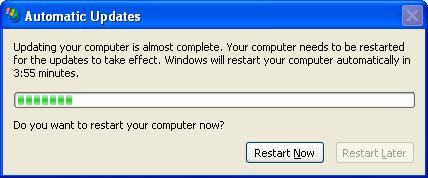
Is it only me or does anyone else find this really frustrating.

message

I got this in the middle of reading my email this morning, and I really didn't want to reboot in 5 minutes. I would have quite hapoily rebooted in half an hour or so when I'd finished what I was doing. The fact that the restart later button was there but disabled just added to the insult.

I think from a layer 8 perspective, Microsoft need to be really careful when forcing reboots. If this happens too frequently, it may be frustrating enough that people actually turn Automatic Updates off, making their systems progressively less secure and vulnerable.

Saturday, August 12, 2006

Web Directions

On thursday night I went along to a Web Directions preview night where 2 of the speakers from the upcomming Web Directions conference Ben Barren from gnoos and John Allsop from westciv were giving previews of their presentatoins at the conference. It was a good night, I particularly enjoyed Johns talk on . This is a topic that I have been interested in for a while now, and may have more to say about it later.

Unlike other events I attend, where I know a fair few people, this event I only found one person I'd met before was Nigel Watson, an Architect Advisor from Microsoft. So it was good to make new contacts and expand my circle beyond the sphere of the Melbourne .Net developer and SQL Server sphere. I got to meet Cameron Adams whose book "The Javascript Anthology" I am currently half way through, and also met the people from westciv who write the best damn web standards online training courses in existance.

When I first heard about the web directions conference, I thought that as much as I'd love to go along, I probably wouldn't be able to attend given that I was already attending Tech Ed at the end of August, and I'd be pushing it a little if I asked my employer to pay for another conference and let me have the time off so close after Tech Ed. As the saying goes, "the best layed plans of mice and men gang aft aglay", there was a lucky door prize drawn at the end of the night, which was a free ticket to attend the Web Directions conference. Guess who won........ So now all I have to do is convince my employer to let me have a couple of days off to attend..... that shouldn't be too hard.

Thursday, July 13, 2006

Stepping through ATLAS Javascript files

I'm trying to debug an application I'm writing using ATLAS, and I'm wnating to know why my attempts to make browser client magic happen are resulting in java script errors. Fortunately Visual Studio provides a level of debugging for java script files which means that if you're in debug mode when a java script error occurs, you'll automatically be taken to the point in the code where the problem occured and given some useful things like a stack trace and a variable watch window. You can also set break points in your own code, however, if you have registered the scriptsw using an Atlas Script manager as is advised when writing ASP.Net applications


<atlas:ScriptManager ID="ScriptManager1" runat="server" >
<Scripts>
<atlas:ScriptReference ScriptName="AtlasUIDragDrop" />
</Scripts>
</atlas:ScriptManager>


you will not be able step into any of the ATLAS libraries you happen to be using as the debugger complains that the source files are not available. This is because of the way the ATLAS scrip manager embeds the java script.

today I found myself thinking that it would be handy to be able to step into these files to find out what's going on prior to the error.

To solve the problem

  1. Copy the necessary java script files from the install location into your project and mark them as "Embedded Resource". In my case Atlas.js and AtlasUIDragDrop.js

  2. Comment out or remove the Atlas Script Manager component

  3. Add the script files as you would add any normal java script file (ie with the <script> tag)


Once you have done this you should be able to step into the ATLAS java script files to your hearts content, but be warned you might find it a little scarey in there.

The only problem with this is that it won't work for Server Side Atlas controls, such as UpdatePanel or Extender controls, but if you're not using them, or if you can comment them out while you debug stuff, then you're set.

Thursday, July 06, 2006

Google Maps and sustainable transport

I have found a great site that is a mashup of google maps. http://www.bikely.com. The idea is you can search the user entered database for the best way to get between various points by bike. The website also allows you to sign in and create your own bike route so you can share your favourite rides with others. You can even put comments at each point that appear as pop-ups on the map. I'll have to start riding my bike more so that I can contribute.

Tuesday, June 27, 2006

Browser Version hell

Those familiar with the concept of DLL hell and have experienced it first hand often point to web based applications as the savior for such deployment issues, and to an extent they're correct. However, as the push for a richer client experience from web applications grows, and as the technologies that enable it mature, DLL hell is being replaced by Browser version hell. We are all aware that Internet Explorer and the Mozilla based browsers (firefox) have their own peculiarities, but even beyond that are the versions of these browsers. In fact, IE 6 has been particularly slammed for some of its, shall we say "non-standard" behaviour. As a result of this I have been a big fan of firefox that is considerably more standards compliant. This has lead to web designers targeting firefox first, and then tweaking sites as needed for other browsers.

For the past 6 months or so I have been neglecting firefox a little in order to try out the all new IE 7 in its various beta forms. IE 7 is supposed to be far more standards compliant, amongst adding other features users of firefox and other browsers take for granted. So as a result, I haven't updated firefox for a while, and using firefox version 1.0.7 I was testing out a new Atlas based control called the collapsible panel control, and the bad news is, It doesn't work. The area that should display when the panel is expanded is displayed completely blank. Upgrading to version 1.5.04 fixes the problem completely. Now admittedly the Atlas Control Toolkit is very much in a pre-release state, but it does raise a very pertinent question.

Where should web developers draw the line and say I'm not going to support versions of browser X before version Y, and how should web sites indicate that a user should upgrade their browser? Also, how many different versions of browser X should we be realistically expected to test under? This I believe is different to the idea of degrading nicely (ie what should happen if a browser doesn't support Java Script or only supports a limited subset of Java Script). All I can say is that I hope the team at Microsoft fix the problem with the control for firefox Version 1.0.7.

Monday, June 26, 2006

Web Application Projects and SQL Express Data Sources

I have been struggling today with some SQL Express related data issues. I have been trying to use a combination of Web Application Projects and ATLAS, as I am convinced that Microsoft have completely stuffed up with their "Web Site" style projects, I really don't want to use them. So to do this you simply create a new Web Application Project, and then copy all the necessary settings from the sample ATLAS web.config file into your own web.config file, and ALL is fine... that is until you want to do something with SQL Express. Regardless of ATLAS, the standard approach is to add a new item to the project and select a SQL Database. This uses SQL Express in a mode called "User Instances". This is designed to allow you to treat the databases primary file (mydatabase.mdf) as though it is just that, a file (impressive if you know what's really going on under the hood and understand how SQL Server normally works), and this is how all the Microsoft demos go, except that they use Web Sites instead of Web Application Projects. The theory is then to add tables, and create a DataSet off these tables. So I thought it would just be a simple matter of creating a Web Application Project, and then following exactly the same logic. WRONG!!!!!!

My first efforts yielded the following error

Description: An error occurred during the compilation of a resource required to service this request. Please review the following specific error details and modify your source code appropriately.

Compiler Error Message: CS0122: MyWebApplicationProject.Properties.Settings' is inaccessible due to its protection level

This is because the default way of storing the connection string is to use the Properties folder and create an entry in the Setteings.Settings file. In this case there is a class called MyWebApplication.Properties.Settings. This has a protection level of "internal" meaning that only code from within the same assembly can refer to it. The code attempting to access it is NOT in the same assembly so it fails compilation.... DOH.

Next step was to attempt to rework it so that it got the connection string from the web.config file. After correcting all the places where I found a reference to the connection string, I received the following error.

Exception Details: System.Data.SqlClient.SqlException: An attempt to attach an auto-named database for file C:\Projects\AtlasApp\AtlasApp\App_Data\App_Data\Tasks.mdf failed. A database with the same name exists, or specified file cannot be opened, or it is located on UNC share.

Better, at least this time it's compiling. After spending entirely too much time attempting to figure out why SQL Server User Instances were failing, I eventually re-read the error message, and noticed the path it was attempting to access. C:\Projects\AtlasApp\AtlasApp\App_Data\App_Data\Tasks.mdf

Notice the two App_Data directories. Yep, so simply exclude the App_Data part of the path in the connection string and away it goes, everything now works.

The reason I write this article is because I found very little documentation on the problems. Problems which I thought would be occurring quite frequently if people are using Web Application Projects, but alas the only mentions I have found are a recognition by Microsoft that there are problems, and a vague promises of a white paper on the issue from Microsoft.

In conclusion, I've had quite a frustrating day, and I think Microsoft still have some work to do on Web Application Projects.

Friday, May 26, 2006

using a custom database for persisted SQL Server ASP.Net session state

I am in the process of upgrading a major project from ASP.Net 1.1 to ASP.Net 2.0, and my ideal is to have 2 versions of the web application able to be run so that I can compare what's going on in the .Net 2.0 version to what should go on according to the .Net 1.1 version. This doesn't seem too difficult, just use a different web folder right? Well, this would be the case except that we're using SQL Server persisted session state and although they use a different schema between .Net 1.1 and .Net 2.0, the default database name is the same "ASPState". After a bit of fiddling around I eventually solved the problem.

Step 1 run the following command line from the appropriate .Net 2.0 directory replacing ASPState_2_0 with the database name you wish to use

aspnet_regsql -S localhost -E -ssa
dd -sstype c -d ASPState_2_0


This creates the session state database with the appropriate schema in the specified database name instead of the default.

Step 2 modify the following line in the web.config file accordingly

<sessionState mode="SQLServer" allowCustomSqlDatabase="true" stateConnectionString="tcpip=127.0.0.1:42424" sqlConnectionString="data source=localhost;Initial Catalog=ASPState_2_0;Trusted_Connection=Yes;" cookieless="false" timeout="15" />

Step 3 Manually give the ASPNet user (or whatever user you are running the ASP.Net web application as the appropriate priviledges on the database tables in the newly created session state databse.

MEDC 2006

Just got back from the MEDC 2006 conference where I was lucky enough to recieve an I-Mate SP5 simply for attending.
sp5

The sessions were all very interesting, my personal favourite was probably the session on performance in the compact framework.

The other interesting thing I learnt is that people are actually reading my blog. Well, if that's the case I might have to buck up my ideas and actually put some half decent content on.

Wednesday, May 24, 2006

A new and exciting project

This week I started a new and very exciting project. I can't really give away all the details as the project is still in the planning phase, but what I can say is that it will be a Web 2.0 project. Now I know Web 2.0 can sound like a bit of a buzz word and as such looses meaning, but I think this article by O'Reily explains Web 2.0 in a way that cuts through most of the marketing hype.

The Web 2.0 concepts that we are thinking of using in this project involve the idea of Mash Up's of a few different services, the idea of collaboration and collective intelligence, technologies such as ATLAS (AJAX for ASP.Net) and the concept of the quick release cycle.

It is interesting that I have ended up on this project. I must be the least experienced ASP.Net developer at Readify, and the last time I did anything commercially for the WEB (almost 2 years ago now), was firmly rooted in Web 1.0 mindset. Since then I have been firmly stuck on the Rich Client side of the divide writing Pocket PC and Desktop style applications. The team lead on this project has suggested that this is probably a good thing as we can take my experience designing and working with rich UI's and not be limited in my thinking of what is capable on the web. We are all getting really excited about the potential of this project, and I will give more details as the project progresses.

Monday, May 08, 2006

To Train or Be Trained... That is the question

Over the past 15 months I have been consulting to QSR and it has been a fantastic experience. The only issue has been that since I've been there I have worked exclusively on a winforms .Net 2.0 application. This has meant that my ASP.Net 2.0 skills were fairly rudamentry, and weren't improving beyond the tiny bit of time I've been able to allocate to professional development on the bus on the way to work.
So I decided to do the Readify Professional .Net which has been recently re-vamped for .Net 2.0. So I rang Chris Hewitt who was instructing the course to tell him of my intention. Chris's paraphrased reply was something like ... "You've been using .Net 2.0 for over a year now, you know more about .Net 2.0 than I do, you can teach some of the course".

So this is how I ended up teaching three modules of a course I was originally intending to sit. The 3 modules I taught were Generics (one of my favourite .Net 2.0 features), Click Once (on Chris's suggestion) and refactoring. It is my goal to to be trained up to a point where I can teach the course myself, and it was good sitting under Chris who has extensive teaching experience. I have always enjoyed teaching ever since I supported myself through uni by tutoring high school maths and physics, and I know it is one of the best ways to ensure your own grounding of the material. The thing that scares me the most is questions. I know I shouldn't be scared, we aren't expected to know everything, and in the rare cases when Chris didn't know the answers, it proved to be a real journey of discovery for allpf us as we attempted to find the answers to these questions.

Tuesday, May 02, 2006

Click Once Deployment Gotcha

In attempting to prepare for a module I am teaching tomorrow, I am putting Click Once through its paces, and I'm finding there are some strange issues. I have been struggling with an unusual error for half the night.

I am Publishing my files to a local site, then openning up internet explorer, navigating to the site and then attempting to Install the application. The application contains a 4 files that require downloading, and it uses SQL Server Express. The Install starts out fine, it then decides it needs to momentarily open a browser window. Now my default browser is Fire Fox, and it decides to open this. At this point firefox decides to prompt me for a username and password. Why I don't know, but seconds after typing in my credentials, it brings up an error saying that it cannot download the application as there are missing files. The install fails.

I eventually figured out that if I change my default browser back to be internet explorer, the problem goes away. Hope this helps someone.